Less hunting.
Search the text you’ve saved. Recognize images by their thumbnails.
 ClipChick
Coming to Mac
ClipChick
Coming to Mac
Clipboard history. Made for Mac.
That link. That paragraph. That screenshot.
Keep the things you copy close at hand,
and get back to what you were doing.
Made for Apple Silicon · macOS 14+
Pre-release preview. Not yet on the Mac App Store.
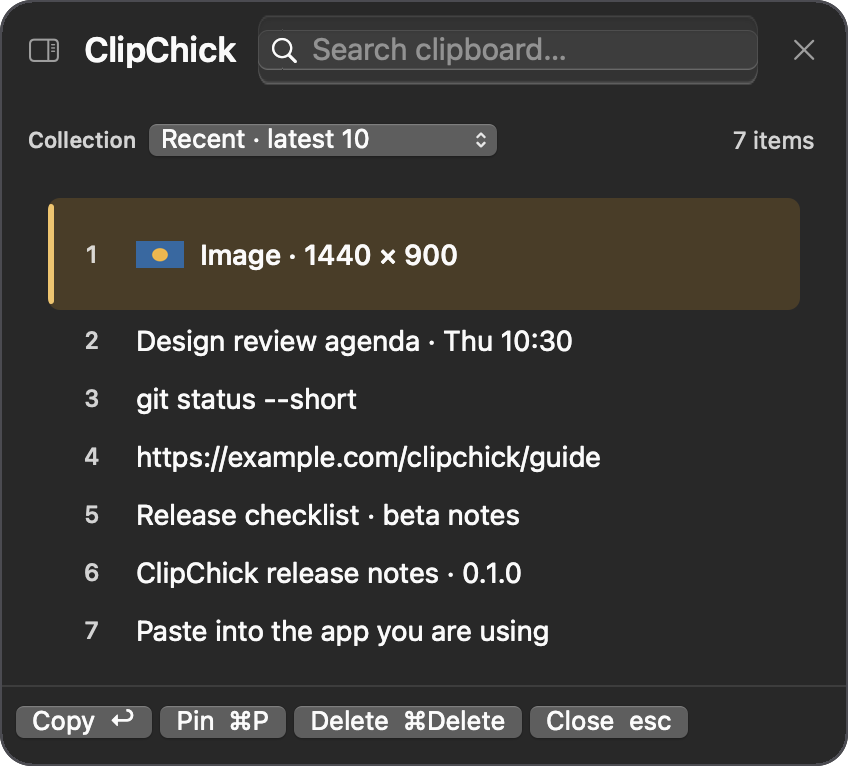
Search the text you’ve saved. Recognize images by their thumbnails.
Pin the links and snippets you reuse. Choose how much history to keep.
Your history stays on this Mac. Pause recording or clear it when you want.
Fits into what you already do
No new way of working to learn.
A paragraph, a link, a screenshot. Use your Mac just as you always do.
A small panel puts your recent clips within reach. Type to search.
Put it back on your clipboard, ready to paste into your work.
Prefer another shortcut? Make it yours in Settings.
Personal things should stay personal
Saved on your Mac. Pause recording or clear your history whenever you want.
Sensitive content needs care: marked confidential clips are skipped, but unmarked passwords can still be saved.
Read the privacy previewGood questions
Not from the Mac App Store yet. ClipChick is in pre-release. This page previews the app; it is not an available-for-purchase announcement. A direct App Store link will appear here when the release is ready.
The current build targets Apple Silicon Macs—M1 or newer—running macOS 14 or later. Intel Macs, iPhone, and iPad aren’t part of this version.
Yes. The clipboard history supports text and images, with thumbnails to help you recognize your image clips. Image support does not mean OCR or searching for text inside screenshots.
The default is your last 10 clips. You can change the limit in Settings, up to 5,000. Pinned clips count toward the limit. Older unpinned clips are removed as new ones arrive.
Automatic paste needs macOS Accessibility permission. Its behavior in the final Mac App Store build is still being verified. Without that permission, choosing a clip copies it; press Command-V in your app to paste.
Neither is part of version one. The core clipboard history and text search work locally, without an AI account or an internet connection.
Launch pricing hasn’t been finalized. The price and purchase details will be shown on the Mac App Store when ClipChick is available.
Small app. Everyday moments.
Coming to the Mac App Store.
For now, take a closer look.